はじめに
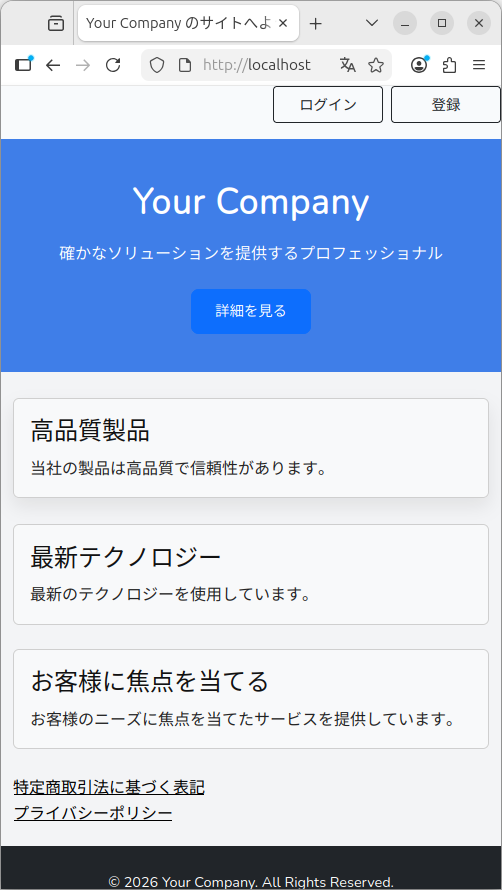
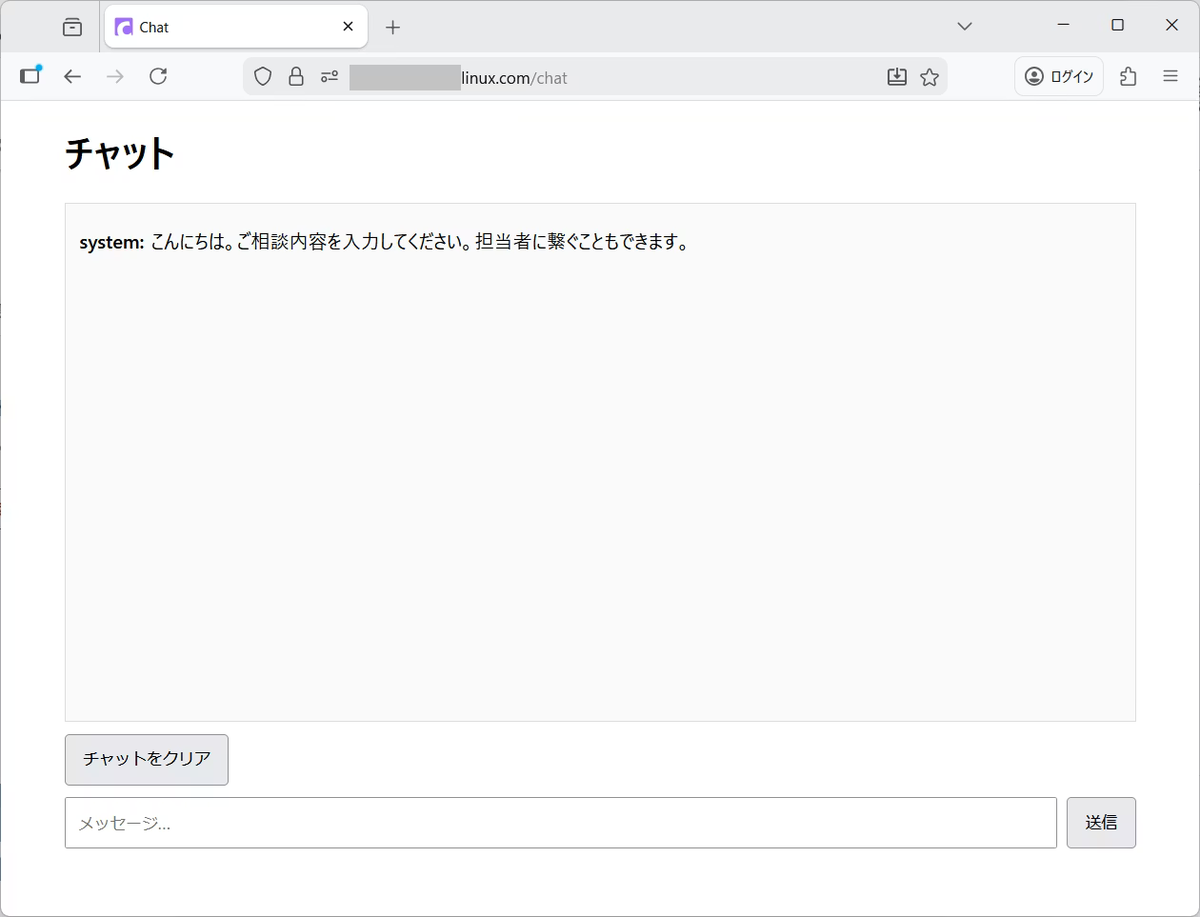
生成AIのチャット(Dify)で何度かやり取りした後に、担当者につないで、人と直接やり取りできるようにするためのインターフェースを作成します。
既存の Laravel に、生成AI向けのチャットUIを追加します。DB は MariaDB(MySQL)を使用しています。
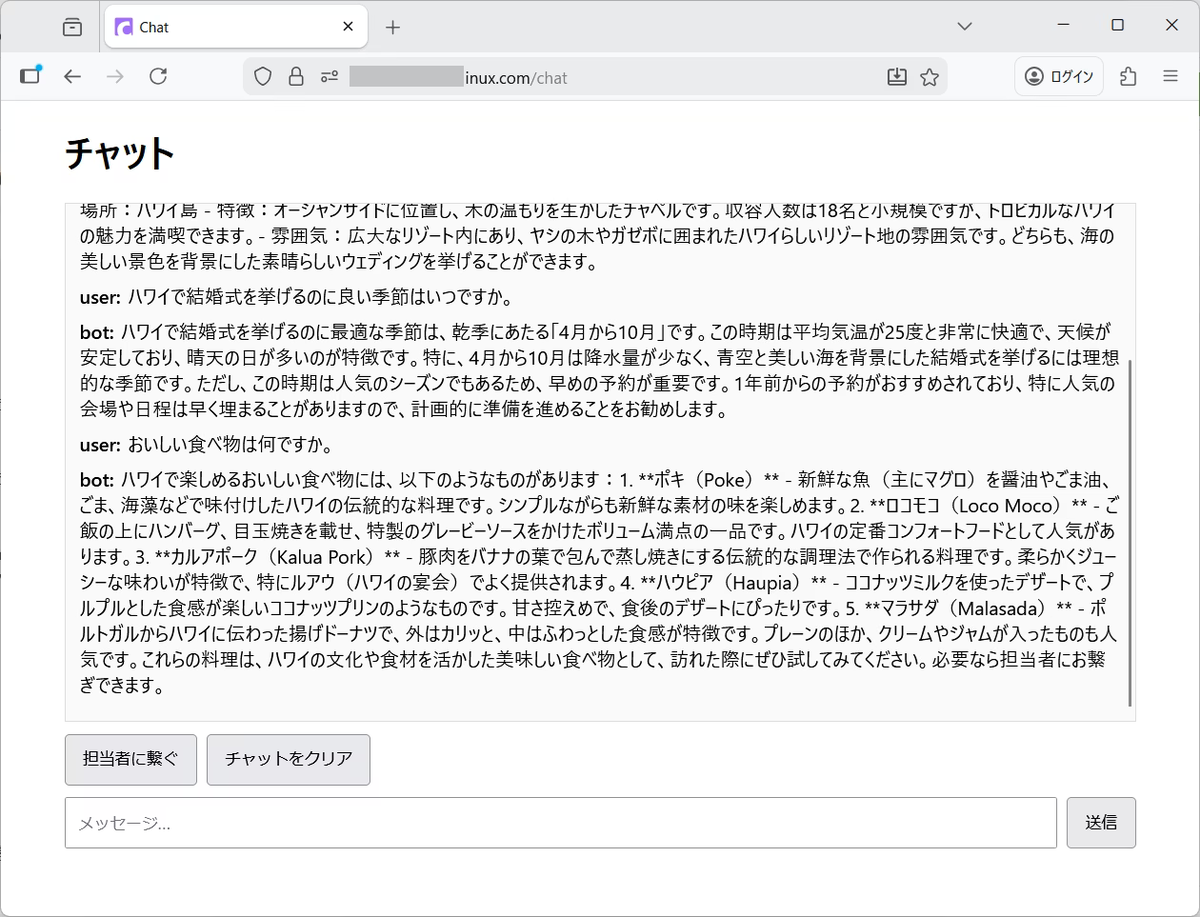
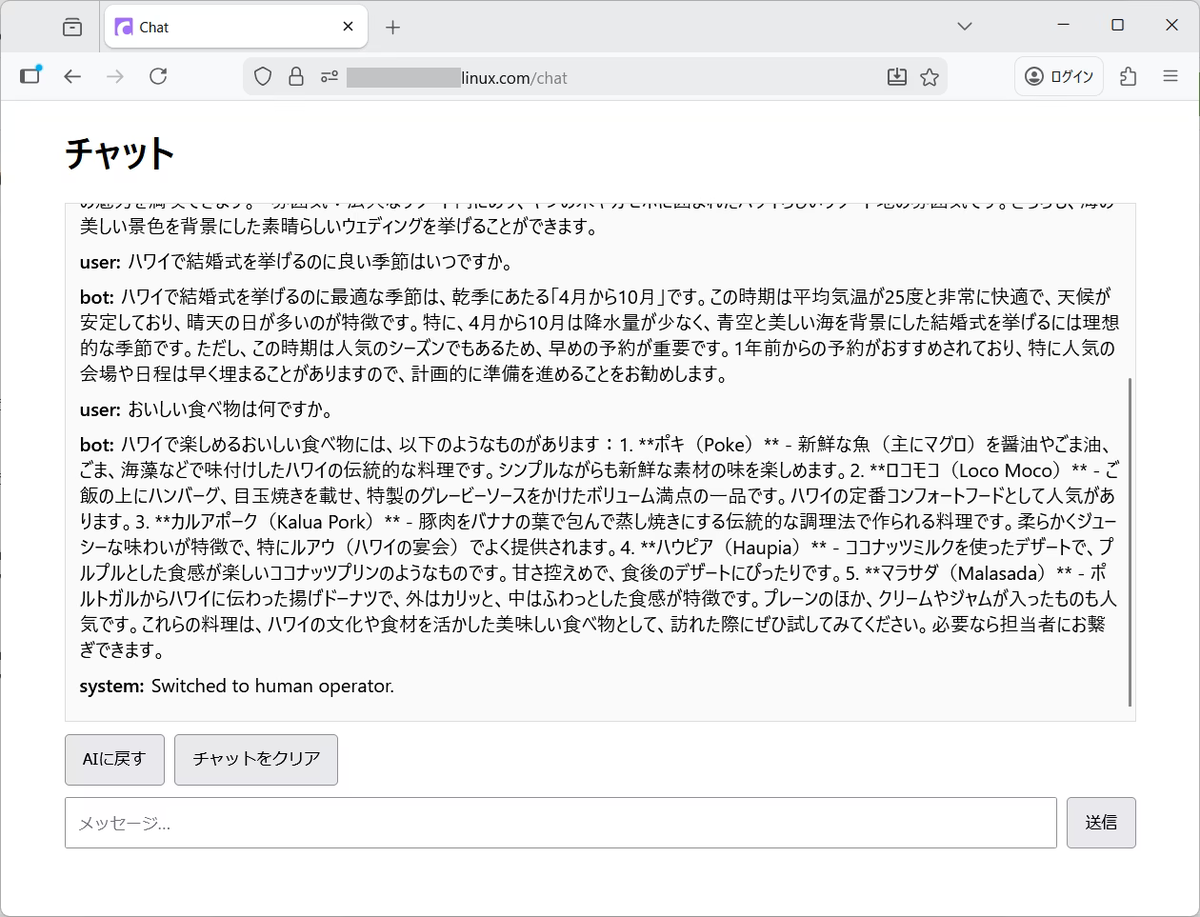
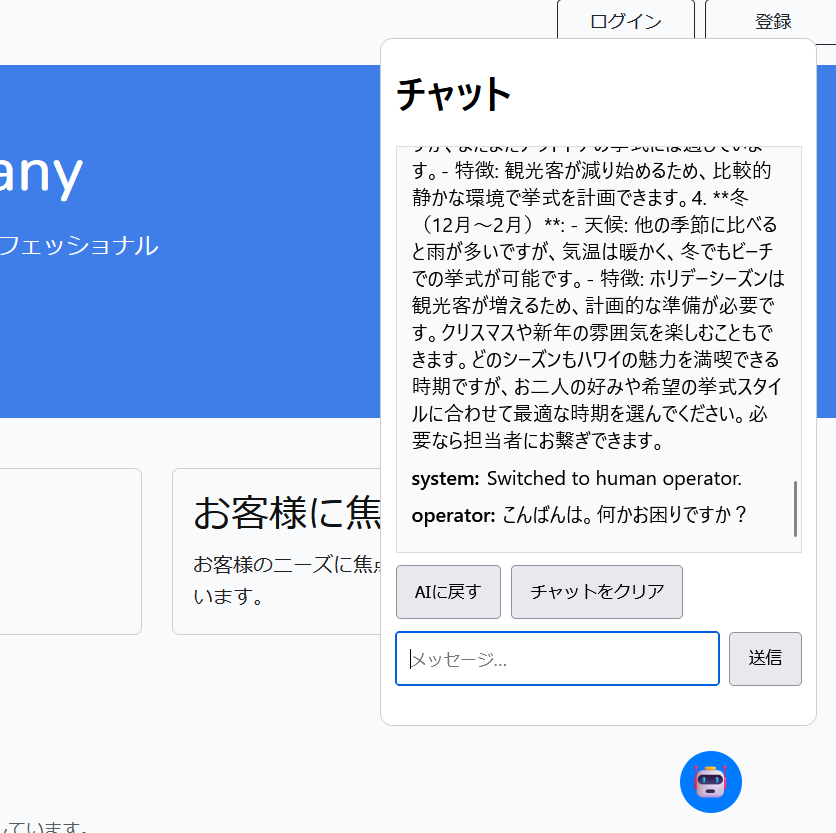
3回対話すると、[担当者に繋ぐ]ボタンが表示されます。オペレーターが操作している画面に会話内容が表示され、チャット中のユーザーとやり取りできるようになります。
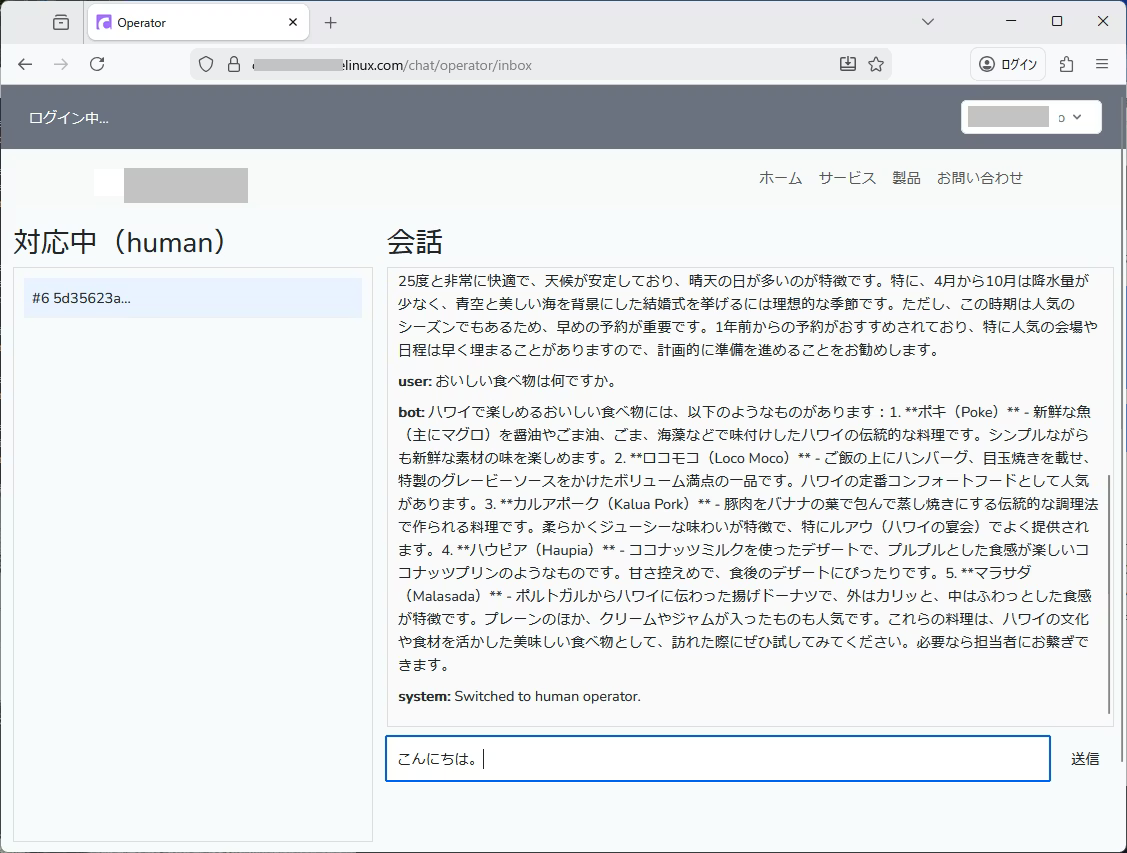
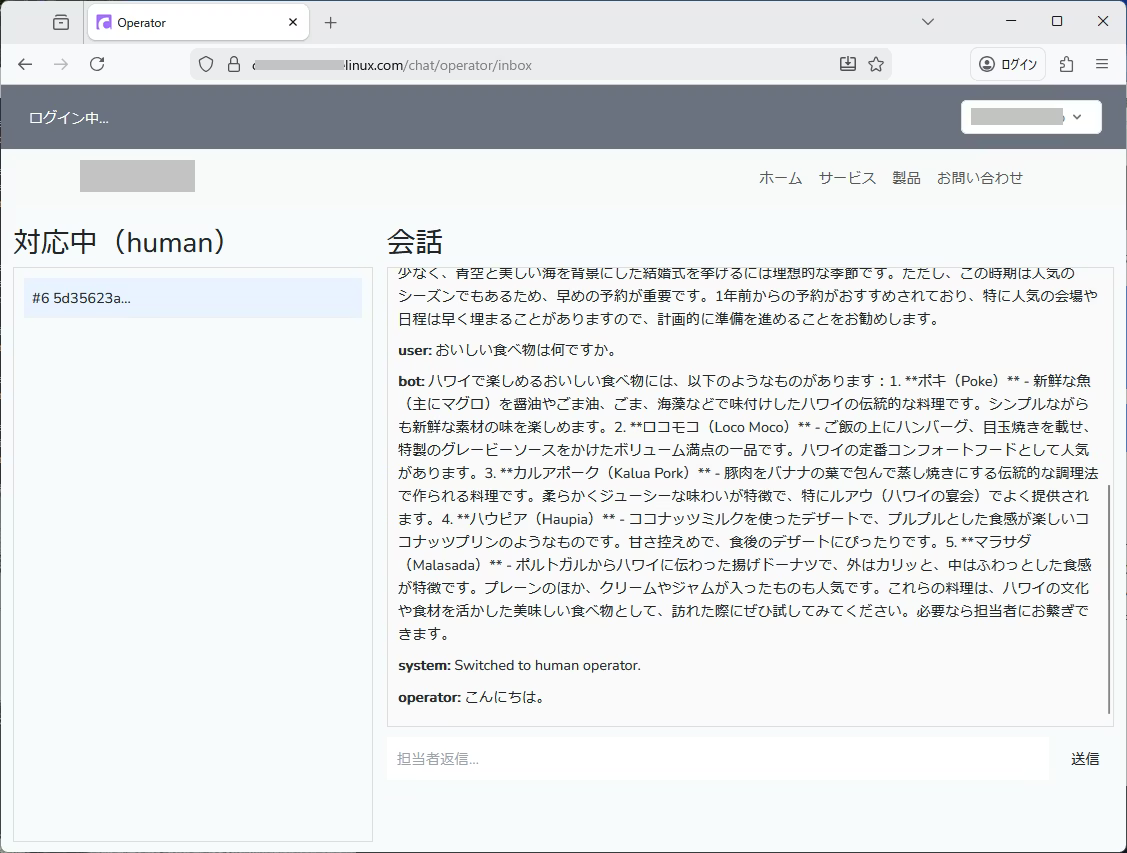
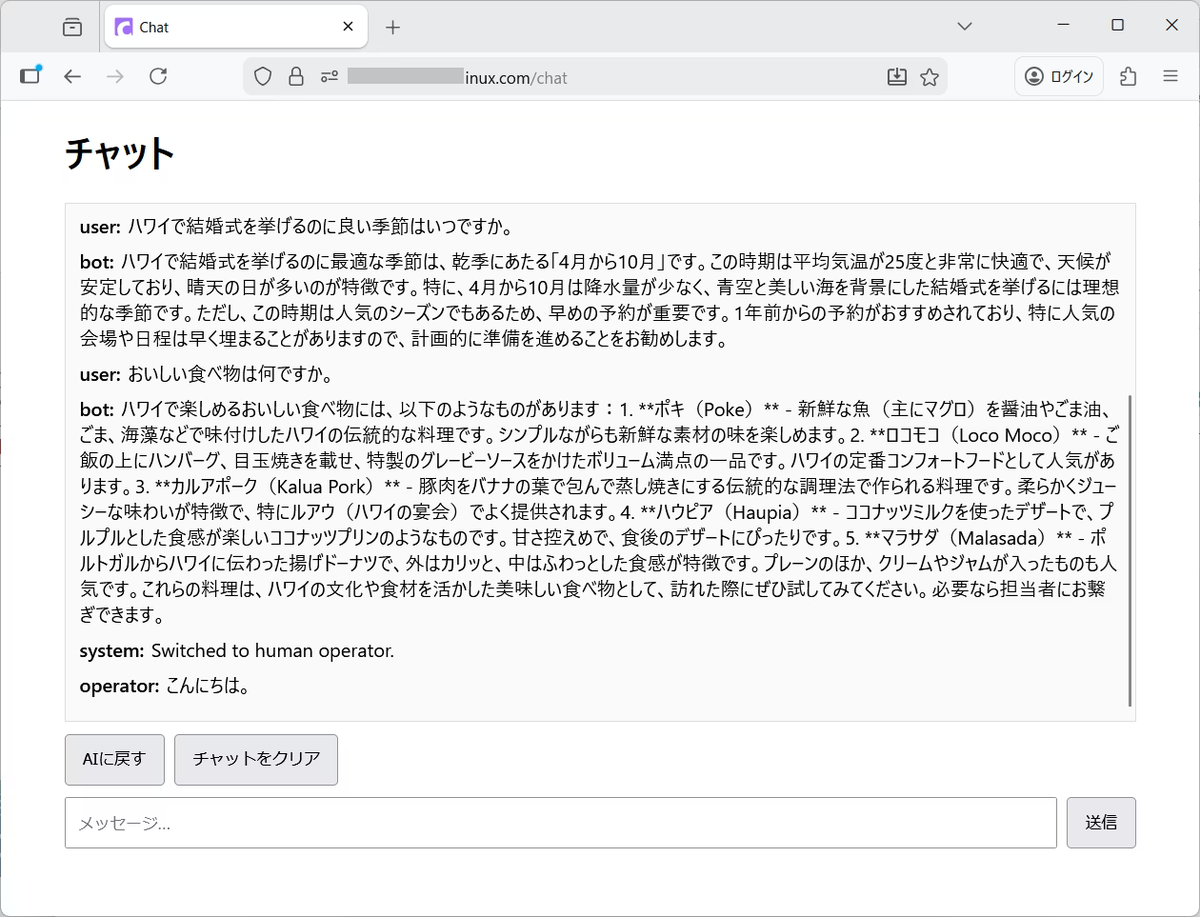
前提: Dify 側の handoff 合図
Dify(チャットアプリ or チャットフロー)の「担当者へ切替を提案する返答」には、末尾などに固定マーカーを付けてください:
・[[HANDOFF]]
Laravel 側がこれを検知して、顧客UIに「担当者に繋ぐ」ボタンを出します。
1) Laravel 作成 & DB 設定
nano .env
DIFY_API_BASE=https://bunkyo-ai.homelinux.com/v1
DIFY_API_KEY=YOUR_DIFY_API_KEY
DIFY_RESPONSE_MODE=streaming
DIFY_HANDOFF_MARKER=[[HANDOFF]]
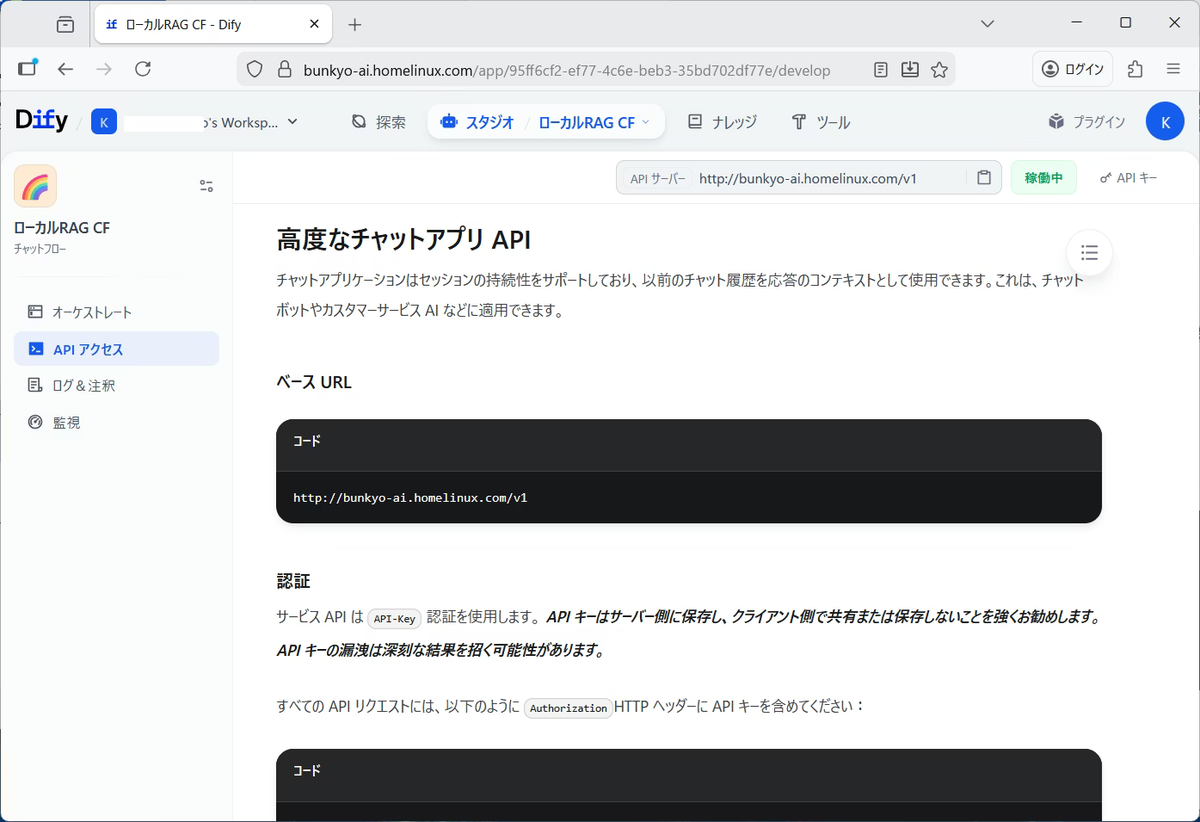
Dify のベース URL と API キー(下図の右上)は、[APIアクセス]ページから取得します。 ベース URL の「/v1」は除きます。 http は https にします。
2) マイグレーション
2.1 conversations
php artisan make:migration create_conversations_table --create=conversations
nano 2026_03_27_xxxxxx_create_conversations_table.php
<?php
use Illuminate\Database\Migrations\Migration;
use Illuminate\Database\Schema\Blueprint;
use Illuminate\Support\Facades\Schema;
return new class extends Migration {
public function up(): void {
Schema::create('conversations', function (Blueprint $table) {
$table->id();
$table->string('app_session_id', 64)->unique();
$table->enum('mode', ['bot','human'])->default('bot');
$table->string('dify_conversation_id', 128)->nullable()->index();
$table->timestamp('last_user_at')->nullable();
$table->timestamp('last_operator_at')->nullable();
$table->timestamps();
});
}
public function down(): void {
Schema::dropIfExists('conversations');
}
};
2.2 messages
php artisan make:migration create_messages_table --create=messages
nano 2026_03_27_xxxxxx_create_messages_table.php
<?php
use Illuminate\Database\Migrations\Migration;
use Illuminate\Database\Schema\Blueprint;
use Illuminate\Support\Facades\Schema;

return new class extends Migration {
    public function up(): void {
        Schema::create('messages', function (Blueprint $table) {
            $table->id();
            $table->foreignId('conversation_id')->constrained()->cascadeOnDelete();
            $table->enum('role', ['user','bot','operator','system'])->index();
            $table->longText('content');
            $table->timestamps();

            $table->index(['conversation_id','id']);
        });
    }
    public function down(): void {
        Schema::dropIfExists('messages');
    }
};
マイグレーション実行
php artisan migrate
3) モデル
php artisan make:model Conversation
nano app/Models/Conversation.php
<?php
namespace App\Models;

use Illuminate\Database\Eloquent\Factories\HasFactory;
use Illuminate\Database\Eloquent\Model;

class Conversation extends Model
{
    use HasFactory;

    protected $fillable = [
        'app_session_id','mode','dify_conversation_id','last_user_at','last_operator_at'
    ];

    public function messages() {
        return $this->hasMany(Message::class);
    }
}
php artisan make:model Message
nano app/Models/Message.php
<?php
namespace App\Models;

use Illuminate\Database\Eloquent\Factories\HasFactory;
use Illuminate\Database\Eloquent\Model;

class Message extends Model
{
    use HasFactory;

    protected $fillable = ['conversation_id','role','content'];

    public function conversation() {
        return $this->belongsTo(Conversation::class);
    }
}
4) Dify 設定(config/services.php)
config/services.php に追加:
'dify' => [
    'base' => env('DIFY_API_BASE', 'https://bunkyo-ai.homelinux.com/v1'),
    'key'  => env('DIFY_API_KEY'),
    'response_mode' => env('DIFY_RESPONSE_MODE', 'streaming'),
    'handoff_marker' => env('DIFY_HANDOFF_MARKER', '[[HANDOFF]]'),
],
5) ルート
nano routes/web.php
<?php
use Illuminate\Support\Facades\Route;
use App\Http\Controllers\ChatPageController;
use App\Http\Controllers\OperatorPageController;
Route::get('/chat', [ChatPageController::class, 'index'])->name('chat.index');
Route::middleware(['auth', 'can:operator'])->group(function () {
Route::get('/chat/operator', function () {
return redirect()->route('chat.operator.inbox');
})->name('chat.operator.home');
Route::get('/chat/operator/inbox', [OperatorPageController::class, 'inbox'])
->name('chat.operator.inbox');
Route::get('/chat/operator/conversations/{conversation}', [OperatorPageController::class, 'show'])
->name('chat.operator.conversations.show');
});
nano routes/api.php
<?php
use Illuminate\Support\Facades\Route;
use App\Http\Controllers\ChatApiController;
use App\Http\Controllers\OperatorApiController;

Route::post('/chat/send', [ChatApiController::class, 'send']);
Route::get('/chat/poll', [ChatApiController::class, 'poll']);
Route::post('/chat/handoff', [ChatApiController::class, 'handoff']);
Route::post('/chat/back-to-bot', [ChatApiController::class, 'backToBot']);

Route::middleware(['web', 'auth', 'can:operator'])->group(function () {
    Route::get('/operator/queue', [OperatorApiController::class, 'queue']);
    Route::get('/operator/messages', [OperatorApiController::class, 'messages']);
    Route::post('/operator/reply', [OperatorApiController::class, 'reply']);
});
Laravel 12 の場合、api.php を読み込むために、次を変更します。(Laravel 10 では不要)
nano bootstrap/app.php
->withRouting(
    web: __DIR__.'/../routes/web.php',
    api: __DIR__.'/../routes/api.php',
)
6) コントローラー(ページ)
php artisan make:controller ChatPageController
nano app/Http/Controllers/ChatPageController.php
<?php
namespace App\Http\Controllers;

use Illuminate\Http\Request;

class ChatPageController extends Controller
{
    public function index()
    {
        return view('chat.index');
    }
}
php artisan make:controller OperatorPageController
nano app/Http/Controllers/OperatorPageController.php
<?php
namespace App\Http\Controllers;
use Illuminate\Http\Request;
use App\Models\Conversation;
class OperatorPageController extends Controller
{
public function inbox()
{
$conversations = Conversation::where('mode', 'human')
->orderByDesc('updated_at')
->get();
return view('chat.operator.inbox', compact('conversations'));
}
public function show(Conversation $conversation)
{
$messages = $conversation->messages()
->orderBy('id', 'asc')
->get();
return view('chat.operator.show', compact('conversation', 'messages'));
}
}
7) コントローラー(API:中継+handoff)
7.1 ChatApiController(Dify の blocking と streaming で共通)
最初に表示されるメッセージ(オープナー)をここに記述しています。
php artisan make:controller ChatApiController
nano app/Http/Controllers/ChatApiController.php
<?php
namespace App\Http\Controllers;
use App\Models\Conversation;
use App\Models\Message;
use Illuminate\Http\Request;
use Illuminate\Support\Facades\Http;
use Illuminate\Support\Str;
class ChatApiController extends Controller
{
private function getOrCreateConversation(Request $request): Conversation
{
$sid = $request->header('X-App-Session-Id');
if (!$sid) abort(400, 'Missing X-App-Session-Id');
$conv = Conversation::firstOrCreate(
['app_session_id' => $sid],
['mode' => 'bot']
);
if ($conv->wasRecentlyCreated) {
Message::create([
'conversation_id' => $conv->id,
'role' => 'system',
'content' => 'こんにちは。ご相談内容を入力してください。担当者に繋ぐこともできます。',
]);
}
return $conv;
}
public function send(Request $request)
{
$request->validate([
'text' => 'required|string|max:8000',
]);
$conv = $this->getOrCreateConversation($request);
Message::create([
'conversation_id' => $conv->id,
'role' => 'user',
'content' => $request->text,
]);
$conv->update(['last_user_at' => now()]);
if ($conv->mode === 'human') {
return response()->json([
'mode' => 'human',
'reply' => null,
'handoff_available' => false,
]);
}
$base = rtrim(config('services.dify.base'), '/');
$payload = [
'query' => $request->text,
'inputs' => (object)[],
'user' => $conv->app_session_id,
'response_mode' => config('services.dify.response_mode', 'blocking'),
];
if ($conv->dify_conversation_id) {
$payload['conversation_id'] = $conv->dify_conversation_id;
}
try {
$res = Http::withToken(config('services.dify.key'))
->acceptJson()
->connectTimeout(10)
->timeout(180)
->post($base . '/chat-messages', $payload);
} catch (\Throwable $e) {
Message::create([
'conversation_id' => $conv->id,
'role' => 'system',
'content' => 'Dify request exception: ' . $e->getMessage(),
]);
return response()->json(['error' => 'Dify request failed'], 502);
}
if (!$res->ok()) {
Message::create([
'conversation_id' => $conv->id,
'role' => 'system',
'content' => 'Dify error: ' . $res->status() . ' ' . $res->body(),
]);
return response()->json(['error' => 'Dify request failed'], 502);
}
$contentType = strtolower((string) $res->header('Content-Type'));
$answer = '';
$difyConversationId = null;
if (str_contains($contentType, 'text/event-stream')) {
$raw = (string) $res->body();
$buffer = '';
$finalAnswer = null;
foreach (preg_split("/\r\n|\n|\r/", $raw) as $line) {
$line = trim($line);
if (!str_starts_with($line, 'data:')) continue;
$jsonLine = trim(substr($line, 5));
if ($jsonLine === '') continue;
$obj = json_decode($jsonLine, true);
if (!is_array($obj)) continue;
if (!empty($obj['conversation_id'])) {
$difyConversationId = $obj['conversation_id'];
}
$ev = (string)($obj['event'] ?? '');
if ($ev === 'message') {
$piece = (string)($obj['answer'] ?? '');
if ($piece !== '') {
$buffer .= $piece;
}
}
if ($ev === 'workflow_finished') {
$maybe = $obj['data']['outputs']['answer'] ?? null;
if (is_string($maybe) && $maybe !== '') {
$finalAnswer = $maybe;
}
}
}
$answer = $finalAnswer ?? $buffer;
}
if ($difyConversationId) {
$conv->dify_conversation_id = $difyConversationId;
$conv->save();
}
$answer = trim($answer);
$marker = config('services.dify.handoff_marker', '[[HANDOFF]]');
$handoff = Str::contains($answer, $marker);
if ($handoff) $answer = trim(str_replace($marker, '', $answer));
Message::create([
'conversation_id' => $conv->id,
'role' => 'bot',
'content' => $answer,
]);
return response()->json([
'mode' => 'bot',
'reply' => $answer,
'handoff_available' => $handoff,
]);
}
public function handoff(Request $request)
{
$conv = $this->getOrCreateConversation($request);
if ($conv->mode !== 'human') {
$conv->mode = 'human';
$conv->save();
Message::create([
'conversation_id' => $conv->id,
'role' => 'system',
'content' => 'Switched to human operator.',
]);
}
return response()->json(['ok' => true, 'mode' => 'human']);
}
public function backToBot(Request $request)
{
$conv = $this->getOrCreateConversation($request);
if ($conv->mode !== 'bot') {
$conv->mode = 'bot';
$conv->save();
Message::create([
'conversation_id' => $conv->id,
'role' => 'system',
'content' => 'Switched back to AI.',
]);
}
return response()->json(['ok' => true, 'mode' => 'bot']);
}
public function poll(Request $request)
{
$conv = $this->getOrCreateConversation($request);
$messages = Message::where('conversation_id', $conv->id)
->orderBy('id', 'asc')
->get(['id','role','content','created_at']);
return response()->json([
'mode' => $conv->mode,
'messages' => $messages,
]);
}
}
7.2 OperatorApiController
php artisan make:controller OperatorApiController
nano app/Http/Controllers/OperatorApiController.php
<?php
namespace App\Http\Controllers;
use App\Models\Conversation;
use App\Models\Message;
use Illuminate\Http\Request;
class OperatorApiController extends Controller
{
public function queue()
{
$list = Conversation::where('mode', 'human')
->orderByDesc('updated_at')
->get(['id','app_session_id','last_user_at','last_operator_at','updated_at']);
return response()->json(['conversations' => $list]);
}
public function messages(Request $request)
{
$request->validate([
'conversation_id' => 'required|integer',
]);
$cid = (int)$request->conversation_id;
$messages = Message::where('conversation_id', $cid)
->orderBy('id', 'asc')
->get(['id','role','content','created_at']);
return response()->json(['messages' => $messages]);
}
public function reply(Request $request)
{
$request->validate([
'conversation_id' => 'required|integer|exists:conversations,id',
'text' => 'required|string|max:8000',
]);
$conv = Conversation::findOrFail((int)$request->conversation_id);
if ($conv->mode !== 'human') {
$conv->mode = 'human';
$conv->save();
}
Message::create([
'conversation_id' => $conv->id,
'role' => 'operator',
'content' => $request->text,
]);
$conv->update(['last_operator_at' => now()]);
return response()->json(['ok' => true]);
}
}
8) ビュー(Blade+JS)
8.1 顧客チャット画面
mkdir resources/views/chat
nano resources/views/chat/index.blade.php
<html lang="ja">
<head>
<meta charset="utf-8"/>
<meta name="viewport" content="width=device-width,initial-scale=1"/>
<title>Chat</title>
<style>
body{font-family:system-ui,sans-serif;max-width:900px;margin:20px auto;padding:0 12px;}
#log{border:1px solid #ddd;padding:12px;height:170px;overflow:auto;background:#fafafa;}
.m{margin:8px 0;}
.role{font-weight:700;margin-right:6px;}
#row{display:flex;gap:8px;margin-top:10px;}
input{flex:1;padding:10px;}
button{padding:10px 14px;}
#actions{display:flex;gap:8px;margin-top:10px;}
#handoffBtn{display:none;}
#backBtn{display:none;}
@media (min-height: 500px){
#log{ height:300px; }
}
</style>
</head>
<body>
<h1>チャット</h1>
<div id="log"></div>
<div id="actions">
<button id="handoffBtn">担当者に繋ぐ</button>
<button id="backBtn">AIに戻す</button>
<button id="clearBtn">チャットをクリア</button>
</div>
<div id="row">
<input id="text" placeholder="メッセージ…" />
<button id="send">送信</button>
</div>
<script>
const sidKey = 'app_session_id';
let sid = localStorage.getItem(sidKey);
if (!sid) {
sid = crypto.randomUUID();
localStorage.setItem(sidKey, sid);
}
const log = document.getElementById('log');
const text = document.getElementById('text');
const sendBtn = document.getElementById('send');
const handoffBtn = document.getElementById('handoffBtn');
const backBtn = document.getElementById('backBtn');
const clearBtn = document.getElementById('clearBtn');
function escapeHtml(s){
return (s ?? '').replace(/[&<>"']/g, c => ({
'&':'&','<':'<','>':'>','"':'"',"'":'''
}[c]));
}
function append(role, content){
const div = document.createElement('div');
div.className = 'm';
div.innerHTML = `<span class="role">${role}:</span><span>${escapeHtml(content)}</span>`;
log.appendChild(div);
log.scrollTop = log.scrollHeight;
}
async function poll(){
const r = await fetch('/api/chat/poll', {
headers: {'X-App-Session-Id': sid}
});
const j = await r.json();
log.innerHTML = '';
j.messages.forEach(m => append(m.role, m.content));
if (j.mode === 'human') {
handoffBtn.style.display = 'none';
backBtn.style.display = 'inline-block';
} else {
backBtn.style.display = 'none';
}
}
async function send(){
const v = text.value.trim();
if (!v) return;
text.value = '';
const r = await fetch('/api/chat/send', {
method:'POST',
headers:{
'Content-Type':'application/json',
'X-App-Session-Id': sid
},
body: JSON.stringify({text: v})
});
const j = await r.json();
if (j.handoff_available)
handoffBtn.style.display = 'inline-block';
await poll();
}
async function handoff(){
await fetch('/api/chat/handoff', {
method:'POST',
headers:{'X-App-Session-Id': sid}
});
handoffBtn.style.display = 'none';
await poll();
append('system', '担当者に切り替えました。担当者の返信をお待ちください。');
}
async function backToBot(){
await fetch('/api/chat/back-to-bot', {
method:'POST',
headers:{'X-App-Session-Id': sid}
});
await poll();
append('system', 'AIに戻しました。');
}
function clearChat(){
if (!confirm('チャット履歴をリセットします。よろしいですか?')) return;
localStorage.removeItem(sidKey);
location.reload();
}
sendBtn.onclick = send;
text.addEventListener('keydown', e => {
if (e.key === 'Enter') send();
});
handoffBtn.onclick = handoff;
backBtn.onclick = backToBot;
clearBtn.onclick = clearChat;
poll();
setInterval(poll, 2000);
</script>
</body>
</html>
8.2 担当者操作画面
mkdir resources/views/chat/operator
nano resources/views/chat/operator/inbox.blade.php
@extends('layouts.main')
@section('title', 'Operator')
@section('content')
<meta name="csrf-token" content="{{ csrf_token() }}">
<style>
.op-wrap{max-width:1200px;margin:20px auto;padding:0 12px;display:flex;gap:14px;}
.op-left{width:360px;}
.op-right{flex:1;}
#queue{border:1px solid #ddd;padding:10px;height:75vh;overflow:auto;}
#log{border:1px solid #ddd;padding:10px;height:60vh;overflow:auto;background:#fafafa;}
.item{padding:8px;border-bottom:1px solid #eee;cursor:pointer;}
.item:hover{background:#f3f3f3;}
.sel{background:#e9f2ff;}
#row{display:flex;gap:8px;margin-top:10px;}
#row input{flex:1;padding:10px;}
#row button{padding:10px 14px;}
</style>
<div class="op-wrap">
<div class="op-left">
<h2>対応中(human)</h2>
<div id="queue"></div>
</div>
<div class="op-right">
<h2>会話</h2>
<div id="log"></div>
<div id="row">
<input id="text" placeholder="担当者返信…" />
<button id="send">送信</button>
</div>
</div>
</div>
<script>
let currentId = null;
const queue = document.getElementById('queue');
const log = document.getElementById('log');
const text = document.getElementById('text');
const sendBtn = document.getElementById('send');
function escapeHtml(s){
return (s ?? '').replace(/[&<>"']/g, c => ({'&':'&','<':'<','>':'>','"':'"',"'":'''}[c]));
}
function append(role, content){
const div = document.createElement('div');
div.style.margin = '8px 0';
div.innerHTML = `<b>${escapeHtml(role)}:</b> ${escapeHtml(content)}`;
log.appendChild(div);
log.scrollTop = log.scrollHeight;
}
async function loadQueue(){
const r = await fetch('/api/operator/queue', {credentials: 'same-origin'});
if (!r.ok) {
queue.innerHTML = `<div style="padding:8px;color:#b00;">queue取得失敗(${r.status})</div>`;
return;
}
const j = await r.json();
queue.innerHTML = '';
(j.conversations ?? []).forEach(c => {
const d = document.createElement('div');
d.className = 'item' + (c.id === currentId ? ' sel' : '');
const shortSid = (c.app_session_id || '').slice(0, 8);
d.textContent = `#${c.id} ${shortSid}…`;
d.onclick = async () => {
currentId = c.id;
await loadMessages();
await loadQueue();
};
queue.appendChild(d);
});
if ((j.conversations ?? []).length === 0) {
queue.innerHTML = `<div style="padding:8px;color:#666;">対応中の会話がありません</div>`;
}
}
async function loadMessages(){
if (!currentId) { log.innerHTML=''; return; }
const r = await fetch('/api/operator/messages?conversation_id=' + encodeURIComponent(currentId), {
credentials: 'same-origin'
});
if (!r.ok) {
log.innerHTML = `<div style="padding:8px;color:#b00;">messages取得失敗(${r.status})</div>`;
return;
}
const j = await r.json();
log.innerHTML = '';
(j.messages ?? []).forEach(m => append(m.role, m.content));
}
async function reply(){
if (!currentId) { alert('会話を選んでください'); return; }
const v = text.value.trim();
if (!v) return;
text.value = '';
const csrf = document.querySelector('meta[name="csrf-token"]').getAttribute('content');
const r = await fetch('/api/operator/reply', {
method:'POST',
credentials: 'same-origin',
headers:{
'Content-Type':'application/json',
'X-CSRF-TOKEN': csrf
},
body: JSON.stringify({ conversation_id: currentId, text: v })
});
if (!r.ok) {
alert('送信に失敗しました(' + r.status + ')');
return;
}
await loadMessages();
}
sendBtn.onclick = reply;
text.addEventListener('keydown', e => { if (e.key === 'Enter') reply(); });
loadQueue();
setInterval(async () => {
await loadQueue();
await loadMessages();
}, 2000);
</script>
@endsection
8.3 会話詳細画面
nano resources/views/chat/operator/show.blade.php
@extends('layouts.main')

@section('title', '会話詳細')

@section('content')

<h3>会話詳細(ID: {{ $conversation->id }})</h3>

<div class="border rounded p-3 mb-4 bg-light">
    @forelse ($messages as $message)
        <div class="mb-2">
            <strong>{{ $message->role }}:</strong>
            <span>{{ $message->content }}</span>
        </div>
    @empty
        <div class="text-muted">メッセージはまだありません。</div>
    @endforelse
</div>

<div class="mt-3">
    <a href="{{ route('chat.operator.inbox') }}" class="btn btn-secondary">
        一覧へ戻る
    </a>
</div>

@endsection
9) Laravel の Gate(認可ルール)
オペレーターの操作は、特定のメールアドレスでログインしたユーザーのみに許可します。
boot() メソッドに追加
nano app/Providers/AppServiceProvider.php
(Laravel 10 の場合は、app/Providers/AuthServiceProvider.php)
use Illuminate\Support\Facades\Gate;

public function boot(): void
{
    Gate::define('operator', function ($user) {
        return in_array($user->email, [
            'admin@example.com',
            'support@example.com',
        ]);
    });
}
(真ん中の 'verified' はメール認証が完了しているかどうかを示します。オペレーター権限は社内用のため、指定は不要です。)
web.php の場合
->middleware(['auth', 'verified', 'can:operator'])
または、
->middleware(['auth', 'can:operator'])
api.php の場合
->middleware(['web', 'auth', 'can:operator'])
Laravel は abort(403) や can ミドルウェアで拒否された場合、errors/403.blade.php ファイルがあれば自動で表示します。
mkdir resources/views/errors
nano resources/views/errors/403.blade.php
@extends('layouts.main')

@section('title', '権限がありません')

@section('content')
<div class="container text-center mt-5">
    <h1>403</h1>
    <p>このページにアクセスする権限がありません。</p>
    <a href="{{ route('product') }}" class="btn btn-primary mt-3">
        製品へ戻る
    </a><br>
    <br>
</div>
@endsection
10) 起動
php artisan serve
11) Dify で [[HANDOFF]] を返す
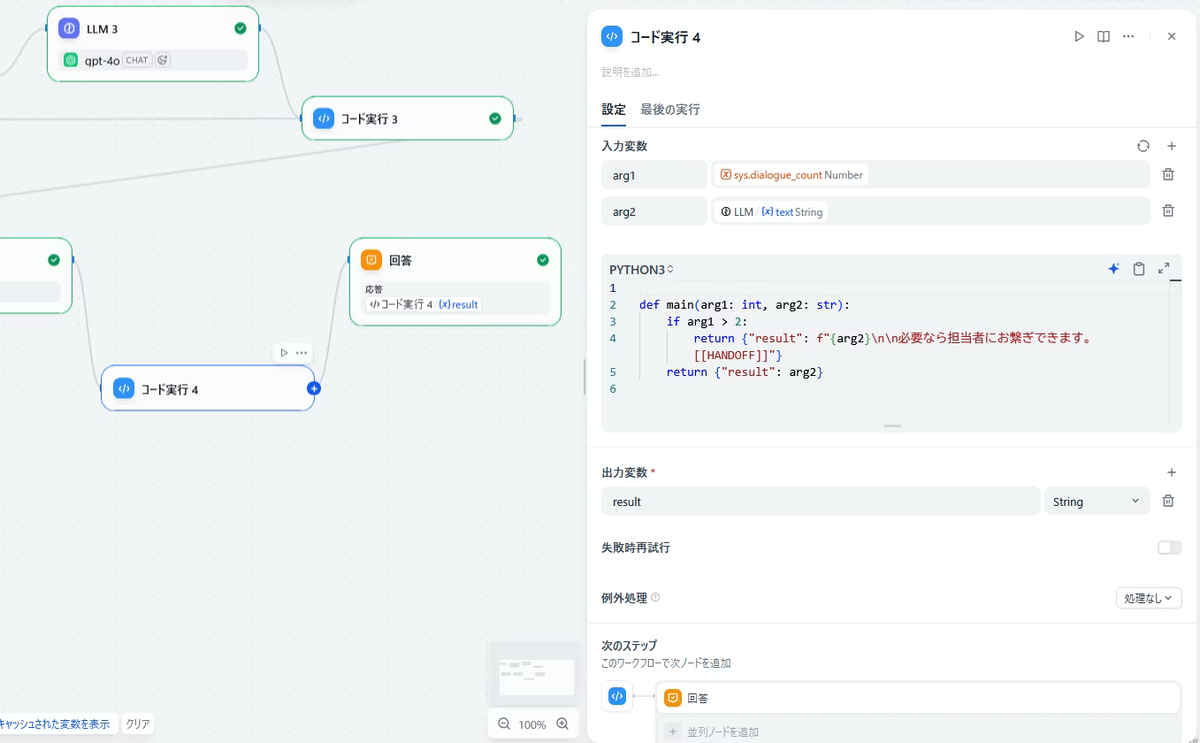
今回は、AIとのやり取りが3回以上行われた場合に、[担当者へ繋ぐ]ボタンを表示するようにします。
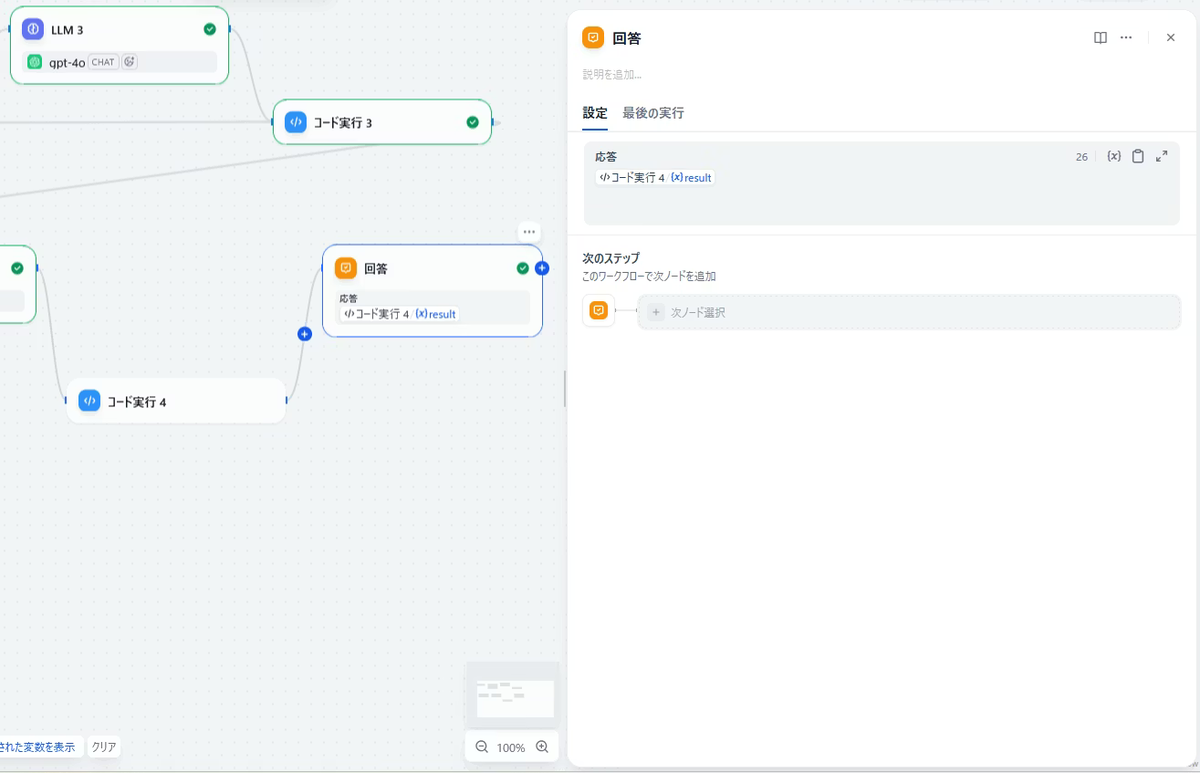
最終の[回答]の直前に[コード実行]を追加します。入力1に sys.dialogue_count、入力2に LLM の出力を設定します。sys.dialogue_count > 2 の場合は、LLM の結果に『担当者にお繋ぎします。 [[HANDOFF]]』を追加して出力します。それ以外の場合は、LLM の結果をそのまま出力します。
また、[回答]は[コード実行]の結果を出力するように変更します。
12) 動作確認
顧客UI(オペレーターとしてログインしている必要はありません)
http://127.0.0.1:8000/chat
担当者UI(もう1台のPCなどから、オペレーターとしてログインします)
http://192.168.1.7:8000/chat/operator
会話詳細(ID: 5)
http://192.168.1.7:8000/chat/operator/conversations/5
Dify との接続を確認するコマンド(Laravel のサーバー上で実行)。YOUR_DIFY_API_KEY は自分の API キーに置き換えます
blocking モード
curl -i -X POST "https://bunkyo-ai.homelinux.com/v1/chat-messages" -H "Authorization: Bearer YOUR_DIFY_API_KEY" -H "Content-Type: application/json" -d '{ "query":"ping", "inputs":{}, "user":"debug-user", "response_mode":"blocking" }'
streaming モードで接続を確認するコマンド。現状の Dify だと streaming モードしか動作しませんでした
streaming モード
curl -N -i -X POST "https://bunkyo-ai.homelinux.com/v1/chat-messages" -H "Authorization: Bearer YOUR_DIFY_API_KEY" -H "Content-Type: application/json" -d '{"query":"ping","inputs":{},"user":"debug-user","response_mode":"streaming"}'
チャットで担当者につなぐと、conversations テーブルの mode が bot から human に変化します
「mode = human の会話」だけをJSONで表示します
http://192.168.1.7:8000/api/operator/queue
埋め込みチャットを作成する
チャットを表示するウェブページに、下記のコードを追加します。
チャット機能のアドレスを /chat と想定しています。
表示位置の調整(#chat-widget-button、#chat-widget-window)
上にずらす → bottom を増やす
右にずらす → right を増やす
表示サイズの調整(#chat-widget-window)
width:350px;
height:420px;
会話部分サイズの調整(resources/views/chat/index.blade.php)
#log{ height:170px; }
表示アイコンの変更
💬
🤖
🎧
<div id="chat-widget-button">🤖</div>
<div id="chat-widget-window">
<iframe src="/chat"></iframe>
</div>
<style>
#chat-widget-button{
position:fixed;
right:80px;
bottom:80px;
width:50px;
height:50px;
background:#007bff;
color:white;
border-radius:50%;
display:flex;
align-items:center;
justify-content:center;
font-size:26px;
cursor:pointer;
z-index:9999;
}
#chat-widget-window{
position:fixed;
right:20px;
bottom:150px;
width:350px;
height:420px;
background:white;
border:1px solid #ccc;
border-radius:10px;
display:none;
overflow:hidden;
z-index:9999;
}
#chat-widget-window iframe{
width:100%;
height:100%;
border:none;
}
@media (min-width: 992px){
#chat-widget-window{ height:550px; }
}
</style>
<script>
const btn = document.getElementById('chat-widget-button');
const win = document.getElementById('chat-widget-window');
btn.onclick = () => {
if(win.style.display === 'none' || win.style.display === ''){
win.style.display = 'block';
} else {
win.style.display = 'none';
}
};
</script>
以上、